
Pardon our dust, this blog post is a work in progress.
If you’ve read our overview of how MCP works in n8n, you know there are four ways n8n interacts with MCP. The MCP Client Tool is the one that gives your n8n AI agent the ability to reach out to external MCP servers — and it’s the piece most people skip over because it sounds redundant.
After all, n8n already has dedicated tools for Google Calendar, Slack, Gmail, and dozens of other services. Why would you use an MCP Client Tool to access the same things?
The answer matters more than you think — and it comes down to who controls the interface.
What the MCP Client Tool Actually Does
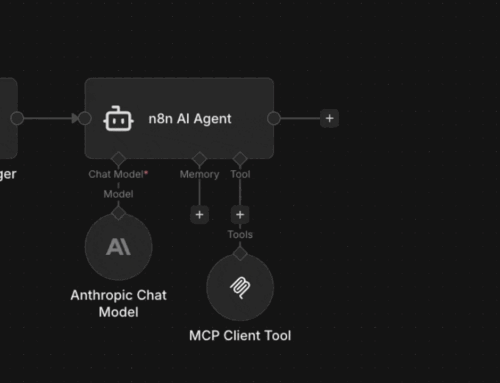
The MCP Client Tool is a tool node — meaning it gets attached to an AI Agent node inside n8n. When the agent needs to do something, it picks from its available tools. The MCP Client Tool is one of those tools.
But instead of calling a single API with hardcoded parameters (like the Google Calendar Tool does), the MCP Client Tool connects to an MCP server and discovers what’s available. It asks “what tools do you have?” and the server responds with a list — names, descriptions, parameter schemas, everything.
The agent then decides which of those MCP tools to call based on the user’s request. It’s dynamic. It’s self-describing. And it means your n8n agent can use tools that didn’t exist when you built the workflow.
MCP Client Tool vs. Native n8n Tools
Let’s compare the two approaches using Google Calendar as an example.
Native Google Calendar Tool
- Built into n8n — first-party integration
- OAuth credentials configured in n8n
- Fixed set of operations (create, update, get, delete events)
- Agent sees one tool: “Google Calendar”
- Parameters are well-defined and pre-mapped
- Fast — direct API call, no discovery step
- Updates come when n8n ships a new version
MCP Client Tool → Google Calendar MCP Server
- Third-party or self-hosted MCP server
- Auth configured at the MCP server level
- Tool list is dynamic — whatever the server exposes
- Agent discovers multiple tools from one connection
- Schemas come from the MCP server, not n8n
- Slower — discovery + execution overhead
- Updates happen when the MCP server updates (independent of n8n)
So When Do You Actually Use the MCP Client Tool?
The native tools are better when they exist. They’re faster, tighter, and purpose-built. Use the Google Calendar Tool for Google Calendar. Use the Slack Tool for Slack. Use the Gmail Tool for Gmail. That’s what they’re for.
The MCP Client Tool shines in three scenarios:
1. The service has no native n8n tool
n8n has hundreds of integrations, but it can’t cover everything. If someone published an MCP server for an obscure API — or you built one yourself with n8n’s MCP Server Trigger — the Client Tool lets your agent use it without waiting for n8n to ship a native integration.
2. You want one agent to access another n8n instance
This is the “reach” use case. Your n8n agent connects to another n8n instance’s MCP Access or MCP Server Trigger and uses its workflows as tools. Cross-instance orchestration without custom webhooks. This is how you build distributed AI agent architectures.
3. You need tool discovery to be dynamic
Native tools are static — they do what they do. MCP servers can change their tool list at any time. If you’re building a system where available tools depend on user roles, configuration, or context, the MCP Client Tool picks up changes automatically. No workflow edits needed.
The Mental Model
Think of it this way:
- Native tools are like apps installed on your phone. Fast, purpose-built, and reliable.
- MCP Client Tool is like a web browser. Slower, but it can access anything that speaks the protocol.
You don’t uninstall your apps because you have a browser. And you don’t skip the browser because you have apps. They complement each other.
In practice, most n8n agent workflows use a mix of both: native tools for the core services they rely on daily, and the MCP Client Tool for reaching out to MCP servers that extend the agent’s capabilities beyond what n8n ships out of the box.
Use native tools when they exist. Use the MCP Client Tool when they don’t — or when you need your agent to reach beyond what’s built in. That’s the whole decision tree.
How MCP Works in n8n
The full overview of all four MCP implementations in n8n — Access, Trigger, Node, and Tool.
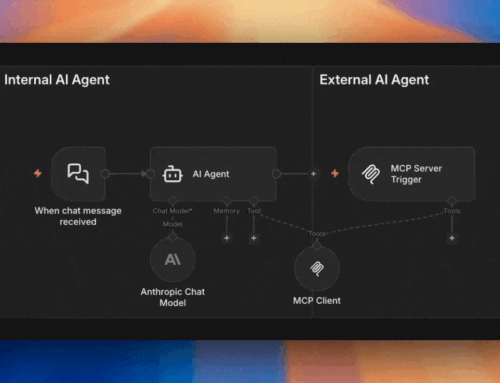
Internal vs External AI Agents
Understanding whether your AI is calling into n8n or running inside it changes how you design your tools.